Serialized interface
Unity does not serialize interface-typed members by default, but interfaces are a core part of clean dependency injection code.
Saneject solves this by generating serialized backing members for interface fields and auto-properties marked with [SerializeInterface].
This gives you interface-based code with normal inspector workflows and editor-time injection.
Why Unity can't "serialize an interface"
Unity serialization supports concrete serializable data and UnityEngine.Object references.
An interface is only a contract, not a concrete serializable type.
So a member typed as IMyService is skipped by Unity's serializer unless you add an explicit serialization bridge.
This matters because Saneject writes resolved dependencies into serialized members. If interface members cannot serialize, interface-based injection cannot persist in scenes and prefabs.
What the Saneject Roslyn generator adds
For each member marked with [SerializeInterface], Saneject generates code in a matching partial class:
- Hidden serialized backing member(s), named
__<memberName>, typed asObject,Object[], orList<Object>. OnBeforeSerialize()to sync interface value → backing value (editor only).OnAfterDeserialize()to sync backing value → interface value.SwapProxiesWithRealInstances()for single interface members, used at when runtime proxies are injected into the interfaces.
Supported member shapes:
- Single interface:
IMyService - Interface array:
IMyService[] - Interface list:
List<IMyService>
User code example
using Plugins.Saneject.Runtime.Attributes;
using UnityEngine;

public partial class GameManager : MonoBehaviour
{
    [Inject, SerializeInterface]
    private IPlayer player;

    [Inject, SerializeInterface]
    private IEnemy[] enemies;

    [field: Inject, SerializeInterface]
    public IGameState GameState { get; private set; }
}
Generated partial
using System.ComponentModel;
using System.Linq;
using Plugins.Saneject.Runtime.Proxy;
using UnityEngine;

public partial class GameManager : ISerializationCallbackReceiver, IRuntimeProxySwapTarget
{
    [SerializeField, HideInInspector, EditorBrowsable(EditorBrowsableState.Never)]
    private Object __player;

    [SerializeField, HideInInspector, EditorBrowsable(EditorBrowsableState.Never)]
    private Object[] __enemies;

    [SerializeField, HideInInspector, EditorBrowsable(EditorBrowsableState.Never)]
    private Object __GameState;

    [EditorBrowsable(EditorBrowsableState.Never)]
    public virtual void OnBeforeSerialize()
    {
#if UNITY_EDITOR
        __player = player as Object;
        __enemies = enemies?.Cast<Object>().ToArray();
        __GameState = GameState as Object;
#endif
    }

    [EditorBrowsable(EditorBrowsableState.Never)]
    public virtual void OnAfterDeserialize()
    {
        player = __player as IPlayer;

        enemies = (__enemies ?? System.Array.Empty<Object>())
            .Select(x => x as IEnemy)
            .ToArray();

        GameState = __GameState as IGameState;
    }

    [EditorBrowsable(EditorBrowsableState.Never)]
    public void SwapProxiesWithRealInstances()
    {
        if (__player is RuntimeProxyBase playerProxy)
            player = playerProxy.ResolveInstance() as IPlayer;

        if (__GameState is RuntimeProxyBase stateProxy)
            GameState = stateProxy.ResolveInstance() as IGameState;
    }
}
What this enables
With [SerializeInterface], you can:
- Use interface fields and auto-properties directly, no wrapper classes needed.
- Assign interface references in the inspector like other serialized references.
- Combine
[Inject]+[SerializeInterface]for clean editor-time DI with persistent scene/prefab data. - Use interface collections (
T[],List<T>) with normal binding and injection workflows.
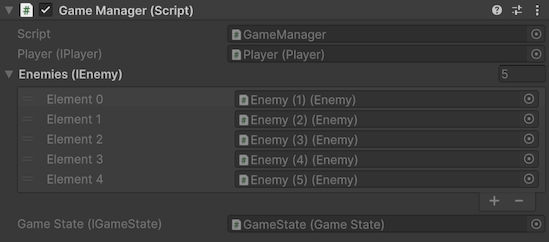
If a serialized interface field is assigned an object that does not implement the expected interface, Saneject's inspector validation clears that reference to null.
Runtime proxy swap hook
SwapProxiesWithRealInstances() is generated by the same source generator.
It is relevant when a serialized interface member currently holds a runtime proxy asset.
At runtime startup, Saneject calls this method for registered proxy swap targets. The generated method checks each single-value interface backing member and replaces any proxy with its resolved runtime instance.
For full proxy behavior and resolution strategies, see Runtime proxy.
Requirements and notes
- The declaring type must be
partial. - The declaring type must be Unity-serializable and non-sealed.
- For auto-properties, use
[field: SerializeInterface]and keep a setter (for exampleprivate set), so generated deserialization can assign the value. - Generated backing members are hidden (
HideInInspector) and editor-browsing-hidden (EditorBrowsable(Never)). - Default Unity inspector ordering would place generated backing members at the end, but Saneject's custom inspector renders them in logical member order. See MonoBehaviour inspector.