Injection toolbar & context menus
Saneject injection context menus are editor commands that run dependency injection on scenes, prefab assets, or batches of assets.
For common full-run workflows, Saneject also exposes contextual main toolbar buttons:
Inject SceneInject HierarchiesInject PrefabBatch Inject
Those toolbar buttons appear only when they apply to the current selection or editor stage, and they always run with ContextWalkFilter.AllContexts.
If you are new to contexts and filters, read Context first.
Toolbar buttons
ℹ️ If you are using Unity 6000.3 or later, you need to manually enable the Inject toolbar by right-clicking the toolbar area and selecting
Saneject Inject Toolbar
The contextual main toolbar buttons cover the most common AllContexts runs.

Inject Scene: shown while editing a scene.Inject Hierarchies: shown while editing a scene and one or more scene objects are selected.Inject Prefab: shown in Prefab Mode.Batch Inject: shown when the Project selection contains one or more scene assets, prefab assets, or folders that contain them.
For more focused runs, use the injection context menus described below.
Context menus
Saneject exposes the same grouped injection commands in multiple Unity menus.

- Main menu:
Saneject/Inject Scene/...Saneject/Inject Selected Scene Hierarchies/...Saneject/Inject Prefab Asset/...
- Hierarchy context menu:
GameObject/Saneject/Inject Scene/...GameObject/Saneject/Inject Selected Scene Hierarchies/...GameObject/Saneject/Inject Prefab Asset/...
- Project window context menu:
Assets/Saneject/Batch Inject Selected Assets/All ContextsAssets/Saneject/Batch Inject Selected Assets/Scene ObjectsAssets/Saneject/Batch Inject Selected Assets/Prefab Asset ObjectsAssets/Saneject/Batch Inject Selected Assets/Prefab Instances
- Main menu batch shortcuts:
Saneject/Batch Inject Selected Assets/All ContextsSaneject/Batch Inject Selected Assets/Scene ObjectsSaneject/Batch Inject Selected Assets/Prefab Asset ObjectsSaneject/Batch Inject Selected Assets/Prefab Instances
There is also a dedicated batch injector window:
Saneject/Open Batch Injector Window
That window is covered in Batch injection.
Scene and prefab injection commands
All commands in Saneject/Inject Scene/..., Saneject/Inject Selected Scene Hierarchies/..., Saneject/Inject Prefab Asset/..., and the matching GameObject/Saneject/... paths use the same injection pipeline. The only differences are:
- Start objects for the run.
ContextWalkFilterselected by that menu item.
Inject Scene group
Menu paths:
Saneject/Inject Scene/All ContextsSaneject/Inject Scene/Scene ObjectsSaneject/Inject Scene/Prefab InstancesGameObject/Saneject/Inject Scene/...
Availability:
- Enabled only while editing a scene.
- Disabled in Prefab Mode.
Behavior:
- Uses the active scene's root
GameObjectobjects as start objects. - Runs injection for that scene using the selected filter.
Inject Selected Scene Hierarchies group
Menu paths:
Saneject/Inject Selected Scene Hierarchies/All ContextsSaneject/Inject Selected Scene Hierarchies/Scene ObjectsSaneject/Inject Selected Scene Hierarchies/Prefab InstancesSaneject/Inject Selected Scene Hierarchies/Same Contexts As SelectionGameObject/Saneject/Inject Selected Scene Hierarchies/...
Availability:
- Enabled only while editing a scene.
- Requires at least one selected
GameObject.
Behavior:
- Uses
Selection.gameObjectsas start objects. - The graph is built from each selected object's root transform, then filtered by the selected
ContextWalkFilter. - This means a selected child can still cause its full root hierarchy to be part of the run.
Inject Prefab Asset group
Menu paths:
Saneject/Inject Prefab Asset/All ContextsSaneject/Inject Prefab Asset/Prefab Asset ObjectsSaneject/Inject Prefab Asset/Prefab InstancesSaneject/Inject Prefab Asset/Same Contexts As SelectionGameObject/Saneject/Inject Prefab Asset/...
Availability:
- Enabled only in Prefab Mode.
Same Contexts As Selectionalso requires a selection.
Behavior:
- For
All Contexts,Prefab Asset Objects, andPrefab Instances, Saneject starts from the current prefab asset root. - For
Same Contexts As Selection, Saneject starts from the current selection.
Filter labels used in menu names
Menu labels in these command groups, including Batch Inject Selected Assets/..., map directly to ContextWalkFilter values:
| Menu label suffix | Context walk filter | Included contexts |
|---|---|---|
All Contexts |
AllContexts |
Scene objects, prefab instances, prefab asset objects |
Scene Objects |
SceneObjects |
Scene object contexts only |
Prefab Instances |
PrefabInstances |
Prefab instance contexts only |
Prefab Asset Objects |
PrefabAssetObjects |
Prefab asset contexts only |
Same Contexts As Selection |
SameContextsAsSelection |
Contexts matching selected start object contexts only |
ContextWalkFilter controls what enters the run. It does not override context isolation.
Context isolation is configured in project settings and still applies during resolution.
See Context.
Batch inject from selected assets
Entry points:
- Main toolbar:
Batch Inject(ContextWalkFilter.AllContexts) Assets/Saneject/Batch Inject Selected Assets/All ContextsAssets/Saneject/Batch Inject Selected Assets/Scene ObjectsAssets/Saneject/Batch Inject Selected Assets/Prefab Asset ObjectsAssets/Saneject/Batch Inject Selected Assets/Prefab InstancesSaneject/Batch Inject Selected Assets/All ContextsSaneject/Batch Inject Selected Assets/Scene ObjectsSaneject/Batch Inject Selected Assets/Prefab Asset ObjectsSaneject/Batch Inject Selected Assets/Prefab Instances

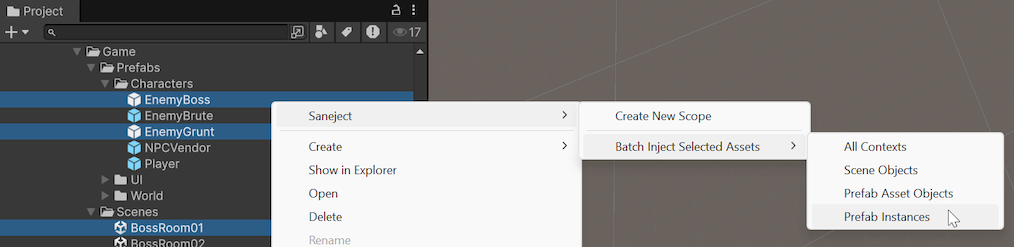
Availability:
- Enabled only when the current Project selection includes at least one scene asset or prefab asset.
- Folder selection works because Saneject scans deep selected assets.
Behavior:
- Collect selected scene and prefab assets.
- Apply the
ContextWalkFilterchosen by the toolbar button or menu item to each collected asset. - Show batch confirmation dialog with scene and prefab counts.
- Ask to save currently modified open scenes before running.
- Inject each selected scene and prefab asset.
- Save scene and asset changes.
- Log per-asset sections and final batch summary.
If an injected asset has no Scope components, the run logs that nothing was injected for that asset or run.
The toolbar button stays on AllContexts; the menu variants give you focused batch runs for SceneObjects, PrefabAssetObjects, or PrefabInstances.
The chosen filter is forwarded as-is to every collected asset, so mixed scene/prefab selections only process matching contexts inside each asset.
Confirmation dialogs
By default, injection context menu commands and contextual toolbar buttons show a confirmation dialog before running injection.
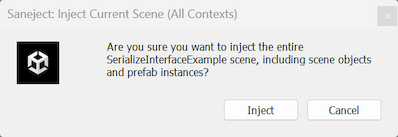
You can toggle these prompts in:
Saneject/Settings/User Settings/Ask Before Injection
Relevant toggles:
ScenePrefab AssetSelected Scene HierarchiesBatch Injection
Example: running a focused scene injection
Run steps:
- Select one or more scene objects in the hierarchy.
- Run
Saneject/Inject Selected Scene Hierarchies/Scene Objects. - Check the Console for Saneject summary logs and any missing binding or dependency errors.
This workflow is useful when you want to validate scene-object wiring without also processing prefab instances in the same run.